

Every business relies on communication. When a lead fills out your WordPress form, you send an automated email response immediately. But what if you want to follow up three days later? Or send a reminder email a week before their scheduled appointment? Or set up an automated drip campaign directly from your contact form? A well-timed Gravity Forms email notification can help you automate these touchpoints and improve customer engagement.
Usually, this requires connecting your site to an expensive external marketing platform via complex webhooks. But with the Gravity Forms Delayed Email Notifications plugin by Ristretto Apps, you can schedule and delay any Gravity Forms email notification directly inside WordPress.
In this guide, we’ll cover how this simple utility works and share creative ways to leverage it to automate your business operations, streamline follow-up communication, and delight your customers.
Why Use Gravity Forms Email Notification Scheduling?
A Gravity Forms email notification can do much more than send an instant confirmation email. By scheduling notifications based on time delays, appointment dates, or custom workflows, businesses can automate follow-ups, reminders, onboarding sequences, and customer engagement campaigns directly from WordPress.
Understanding the Core Features of Gravity Forms Delayed Notifications
This plugin offers a native, seamless way to queue and schedule your form notifications. No external subscriptions, no third-party APIs—just reliable scheduling powered by WordPress.
The Gravity Forms email notification scheduling system includes several powerful options that allow you to automate communication based on your exact business requirements:
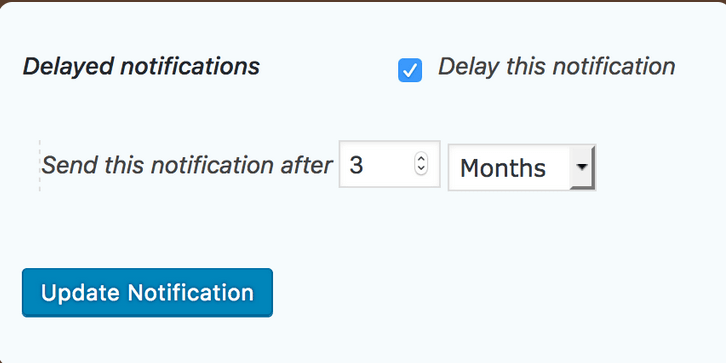
- Relative Time Delay: Schedule email notifications to go out after a specific period of time (e.g., 2 hours, 3 days, 1 month) from the exact moment of form submission.
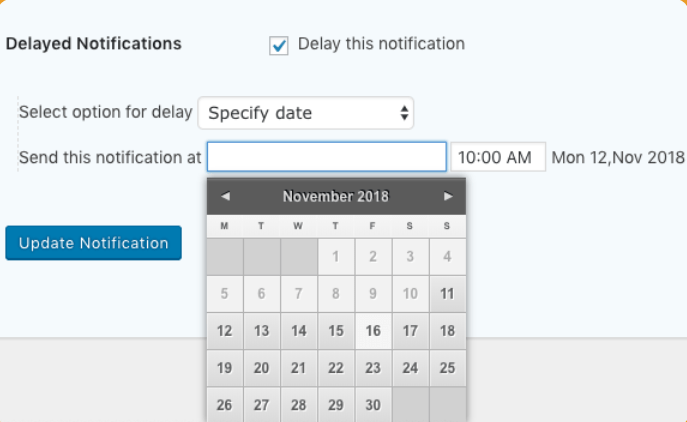
- Specific Date and Time: Choose a concrete date and time for your emails to fire (perfect for product launches or fixed event deadlines).
- Relative to Form Date Fields: Fire notifications dynamically relative to a date field submitted in the form itself. For instance, you can trigger a reminder email “3 days before” an event or a follow-up “1 day after” an appointment.
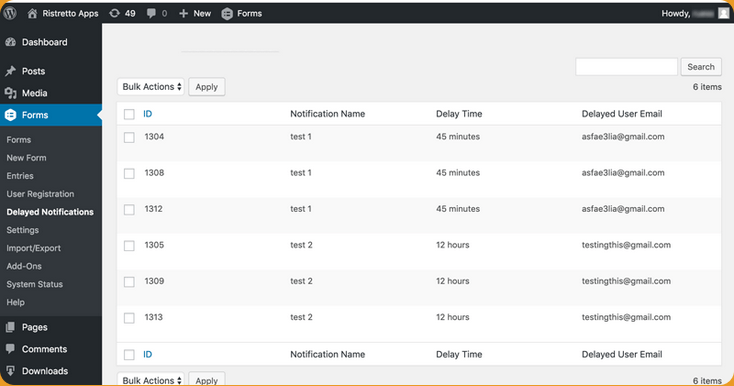
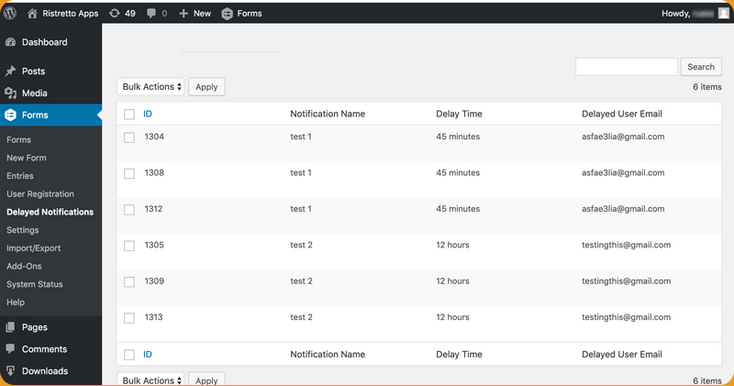
- Centralized Queue Manager: View, filter, and manage all your pending, completed, or cancelled notifications in a clean admin dashboard.
4 Creative Business Workflows Utilizing Gravity Forms Delayed Notifications
Let’s explore some highly effective, creative ways to utilize this plugin to grow your business:
1. Automated Customer Feedback Loops
Instead of bombarding customers with a feedback request the instant they make an inquiry, give them time to experience your service. Set up a Gravity Forms delay notification to send an email exactly 7 days after their booking. This delay makes the feedback request feel personalized and significantly increases response rates.
2. Event & Appointment Reminders
If you use forms for booking consultations or events, you can leverage date-field relative scheduling to set up a sequence of reminders:
- One email 3 days before the event to confirm attendance.
- A second email 1 hour before the event with the meeting link.
- A third email 1 day after the event with follow-up resources.
This keeps your attendance high and your participants engaged without any manual overhead.
3. Lead Nurturing & Onboarding Drip Sequences
You don’t need a heavy CRM to nurture your form sign-ups. You can build a lightweight automated email sequence using multiple notifications on a single form:
- Notification 1: Sent immediately (Welcome email + Lead magnet PDF).
- Notification 2: Delayed by 2 days (“Here is a helpful tip”).
- Notification 3: Delayed by 5 days (“Book a demo with us”).
4. Birthday Marketing
If you collect birthdays or anniversaries on your contact form, you can schedule an automated celebratory email to go out exactly on that day, offering a special coupon code to drive repeat sales.
Why Ristretto Apps’ Solution Stands Out
With a native integration, your Gravity Forms setup remains clean. Because the plugin is optimized for reliable delivery, it queues notifications gracefully and processes them in batches via WP-Cron, ensuring your server remains performant.
With plans starting at just $69/year, it’s an incredibly cost-effective alternative to SaaS platforms that charge based on subscriber count. Whether you are running a single site or managing a suite of client sites as a developer, this tool is the missing link for your form automation.
Conclusion
A well-timed Gravity Forms email notification can significantly improve customer engagement, increase attendance rates, and automate repetitive communication tasks that would otherwise require manual effort. Whether you’re sending appointment reminders, onboarding sequences, follow-up emails, or customer feedback requests, delayed notifications help ensure your message arrives at exactly the right time.
By combining the flexibility of Gravity Forms with intelligent email scheduling, businesses can build more effective workflows while reducing administrative overhead. For organizations looking to automate communications without relying on expensive third-party marketing platforms, Gravity Forms Delayed Email Notifications provides a simple and cost-effective solution.
Get Started Today
Are you ready to level up your WordPress workflows? Say goodbye to manual follow-ups and expensive third-party tools. Easily schedule email notifications in Gravity Forms and start building intelligent, delayed sequences that save you time and grow your revenue.
👉 Get Gravity Forms Delayed Email Notifications from Ristretto Apps today!
