

Why Your Gravity Forms Checkout Needs a Pricing Table
A Gravity Forms pricing table is one of the easiest ways to increase conversions on your WordPress checkout pages. Instead of showing visitors a plain list of radio buttons or product options, you can present beautiful, interactive pricing cards that make comparing plans simple and encourage faster purchasing decisions.
If you run a WordPress site that accepts payments or memberships through Gravity Forms, you already know how powerful the form builder is. However, creating an attractive Gravity Forms pricing table isn’t possible out of the box.
That’s where Gravity Pricing Tables comes in. This premium plugin seamlessly integrates with Gravity Forms to give you a drag-and-drop pricing table builder, no shortcodes, no custom CSS, just beautiful, interactive pricing tables that dynamically update your form totals.

What Is a Gravity Forms Pricing Table?
A Gravity Pricing Table allows you to present pricing plans in an engaging card-based layout instead of traditional radio buttons or dropdowns. Gravity Pricing Tables is a premium plugin that adds a dedicated Pricing Table field to Gravity Forms, making it easy to build interactive pricing experiences that automatically update totals as customers compare plans.
Key Features at a Glance
- Drag-and-Drop Pricing Table Field — Add a pricing table to any form by simply dragging the field into your form layout. No shortcodes, no template files to edit.
- Clear Plan Selection — When a user clicks a plan, it gets visually highlighted so they know exactly what they’re choosing. Reduces checkout confusion and abandoned carts.
- Dynamic Total Calculation — The form’s total price updates instantly based on the selected plan. Customers see the price change in real time as they compare options.
- Reusable Pricing Tables — Create a pricing table once and reuse it across multiple forms. Perfect for SaaS sites with consistent pricing tiers.
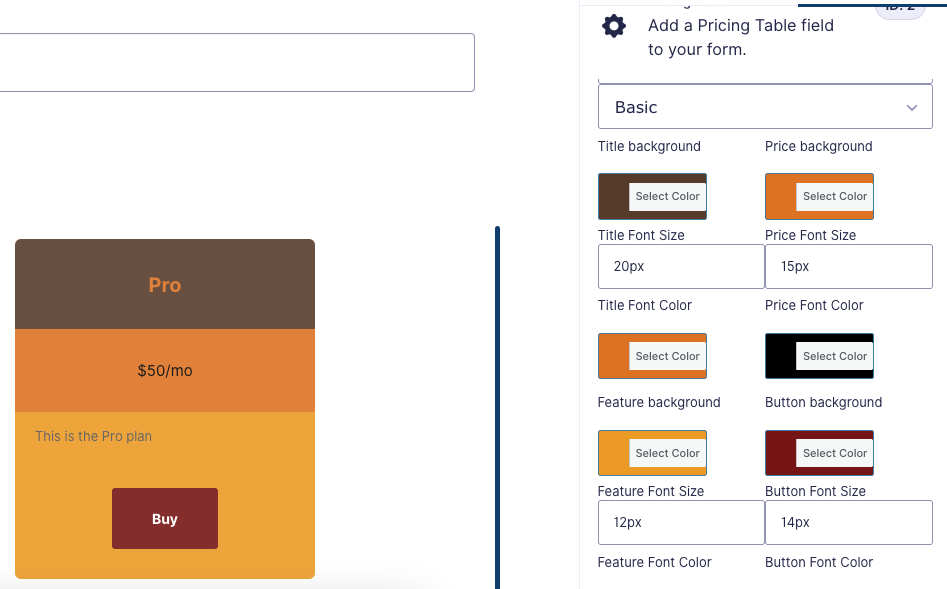
- Pre-Defined & Custom Color Schemes — Choose from professionally designed color palettes or create your own to match your brand.
Creative Ways to Use Gravity Pricing Tables
The plugin is incredibly versatile. Here are four creative ways you can leverage it beyond the obvious membership signup:
1. Tiered Service Packages
If you offer services like consulting, design packages, or maintenance plans, use Gravity Pricing Tables to let clients select their tier. The dynamic total means they see the final price immediately — no jumping between pages or confusing multi-step forms.

2. Event Registration with Tiered Pricing
Running a conference, workshop, or online course? Early bird, standard, and VIP pricing tiers are a perfect use case. Set up your pricing table so attendees can see what each tier includes — and watch the dynamic total update as they add optional extras.
3. Donation & Supporter Levels
Non-profits and creators can use pricing tables for supporter tiers. Show what each donation level unlocks (exclusive content, shoutouts, premium access) and let supporters pick the tier that feels right. The visual card layout makes each option feel tangible and valuable.
4. Product Bundles with Upsells
E-commerce stores using Gravity Forms can showcase product bundles. The Basic, Pro, and Developer pricing structure naturally guides customers toward higher-value options — a proven conversion optimization technique.

Getting Started with Gravity Pricing Tables
Setting up your first pricing table takes minutes:
- Install the Plugin — Download and activate Gravity Pricing Tables from your Ristretto Apps account.
- Create a New Form — Build a Gravity Forms checkout form as you normally would.
- Add the Pricing Table Field — Drag the “Pricing Table” field into your form. Configure your plan names, prices, and feature lists.
- Choose a Color Scheme — Pick from pre-built themes or customize your own colors.
- Publish and Profit — Embed the form on your site. Your pricing table is live, interactive, and automatically calculating totals.
With the Developer license, you can use the plugin on unlimited sites — perfect for agencies managing multiple client projects.
Why Choose Gravity Pricing Tables Over Other Solutions?
There are plenty of pricing table plugins for WordPress, but most of them are disconnected from your actual checkout flow. Gravity Pricing Tables lives inside Gravity Forms, so the pricing selection directly feeds into the payment calculation — no sync issues, no manual total overrides, and no frustrating user experience gaps.
Plus, because it’s built specifically for Gravity Forms, you get native support for all Gravity Forms payment add-ons: Stripe, PayPal, Authorize.net, and more. Your pricing data flows directly into your payment gateway without any middleware.
Conclusions
A well-designed Gravity Forms pricing table can dramatically improve your checkout experience by helping customers compare plans, understand pricing, and make confident purchasing decisions. Instead of relying on static pricing tables that aren’t connected to your checkout, Gravity Pricing Tables integrates directly with Gravity Forms for a seamless experience from plan selection to payment.
Whether you’re selling memberships, services, subscriptions, SaaS plans, or digital products, Gravity Pricing Tables helps you create beautiful pricing experiences that increase conversions while keeping everything inside Gravity Forms.
Get Gravity Pricing Tables today and build your first Gravity Forms pricing table in minutes.
