

We love Gravity Forms. We use it for everything, from contact forms to complex checkout systems. One of our sites runs so many interconnected Gravity Forms that it behaves almost like a SaaS. Yet for years, one thing was missing: a reliable Gravity Forms pricing table that fit naturally into our checkout.
I have tried other checkout systems for WordPress — WooCommerce, SamCart, and several membership registration tools — and every time I came back to Gravity Forms for payments. The only gap was presenting pricing options attractively inside the form itself.
Table of Contents
The Problem: No Reliable Gravity Forms Pricing Table
Gravity Forms is simple, elegant, and highly functional, so it was frustrating that I could never cleanly integrate a pricing table into a checkout form. I tried workarounds — pasting shortcodes from other pricing-table plugins into an HTML field, then using custom JavaScript to update the form total based on the selected tier.
These cobbled-together fixes were rarely reliable and could lead to missed sales when an update went awry. By early 2018 I had had enough: we were launching a new business built on Gravity Forms as its primary checkout, and it needed a dependable way to show pricing options.
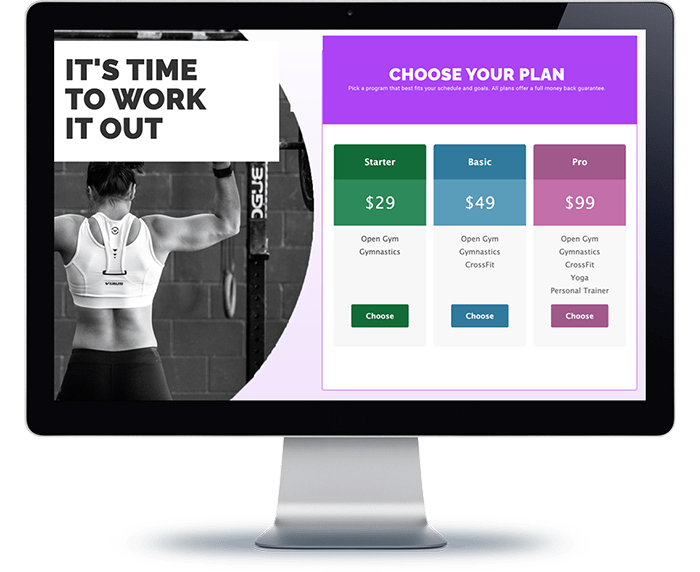
Enter Gravity Tables: A Pricing Table Plugin Built for Gravity Forms
So we built the plugin we wished existed: a fully featured Gravity Tables pricing table you can drop anywhere in a Gravity Form, woven directly into the Gravity Forms platform. The result is a pricing-table field you drag and drop into any form, with all the behavior you expect from a native field:
- Show the pricing table based on another field’s selection (conditional logic)
- Act as a product field that affects the form’s total price
- Collect payments through the official PayPal, Stripe, and Authorize.Net add-ons for Gravity Forms
On top of those built-in Gravity Forms capabilities, our favorite thing about the Gravity Forms pricing table is simply how good it looks.
We designed a handsome template that makes your pricing levels come to life, compared to the bland dropdowns or radio buttons Gravity Forms offers by default.
Why Beauty Matters for Your Pricing Plans

Since adding a pricing table to our checkout with Gravity Tables, sales of our higher-tier options have gone up. Clear, attractive feature descriptions for each level help customers justify choosing the plan that is genuinely the better value.
If you run a SaaS, membership site, coaching program, or e-learning platform on Gravity Forms, a well-designed Gravity Forms pricing table can meaningfully improve how many customers choose your higher-tiered products. Browse our full toolset on the Ristretto Apps apps page.
